Tiger 3D Cartoon Text Effect for Illustrator
In the crowded landscape of digital design, grabbing attention often comes down to a single visual element: your typography. When standard fonts fail to convey energy or personality, designers turn to stylized text effects that bring characters to life. The Tiger 3D Cartoon Text Effect is one such solution, offering a vibrant, editable way to transform plain headlines into bold, animated-looking statements. Whether you are crafting a social media campaign or designing a print flyer, this specific effect provides a shortcut to high-impact visuals without requiring advanced 3D modeling skills.
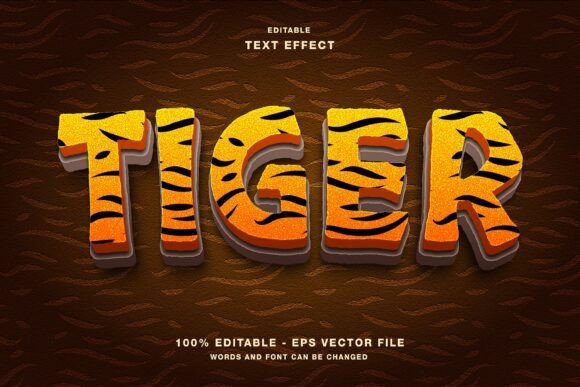
This resource is specifically built for Adobe Illustrator, making it an essential tool for professionals who need scalable, crisp graphics. Unlike static images where the text is flattened and unchangeable, this template is fully editable. You can type your own message, adjust the spacing, and customize the colors while retaining the complex 3D structure and cartoon aesthetic. It bridges the gap between quick templates and custom illustration work, saving hours of manual vector manipulation.
Why Choose a Customizable 3D Text Style?
The primary advantage of using a dedicated template like the Tiger 3D Cartoon Text Effect lies in its flexibility. Many free or low-cost assets found online come as raster images (JPG or PNG) with locked text. Once downloaded, you are stuck with whatever words were originally typed. If you need to change "Summer Sale" to "Winter Clearance," you must use Photoshop to paint over the letters or find a completely new image.
With this Illustrator-based template, the workflow is seamless. Because the file is vector-based, every curve, shadow, and highlight remains editable. You can open the file, click on the text layer, and instantly replace the sample content with your brand name, event title, or promotional slogan. The 3D geometry and cartoon styling automatically adapt to your new input, ensuring consistency in quality regardless of the word count or length.
Furthermore, the inclusion of both Eps and Jpg files in the main folder offers versatility across different stages of a project. The Eps file serves as the master source for editing in Illustrator, allowing for infinite scalability. The Jpg versions provide immediate previews or can be used directly in web layouts where vector editing isn't necessary. This dual-format approach ensures you have the right asset for every scenario, from initial mockups to final delivery.
Key Features and Technical Specifications
Understanding the technical makeup of the Tiger 3D Cartoon Text Effect helps in maximizing its potential. The design relies on a distinct color mode: RGB. This is a crucial detail for digital creators. RGB (Red, Green, Blue) is the standard color model for screens, meaning the colors will appear vibrant and true-to-life on monitors, tablets, and smartphones. While CMYK is required for professional offset printing, many modern digital-first campaigns prioritize screen accuracy. For those needing to print, the vector nature of the file allows for easy conversion to CMYK profiles within Illustrator before sending to a printer.
The "cartoon" aspect of the effect does not imply childishness; rather, it suggests a playful, approachable, and energetic style. The 3D rendering adds depth and dimension, making the text pop off the background. Key characteristics include:
- Fully Editable Layers: Every component, from the base letter shapes to the extrusion and highlights, is grouped logically for easy access.
- Scalability: As a vector graphic, the text can be resized from a small icon to a massive billboard without losing resolution or becoming pixelated.
- Color Customization: While the default palette is set for impact, all fill and stroke attributes can be altered to match your brand guidelines.
- Format Compatibility: Designed natively for Adobe Illustrator but compatible with other vector software that supports EPS formats.
These features make the template a robust addition to any designer's library. It eliminates the tedious process of creating 3D text from scratch, which involves setting up lighting, defining materials, and adjusting mesh points manually.
Practical Applications Across Industries
The utility of the Tiger 3D Cartoon Text Effect extends far beyond simple decoration. Its dynamic appearance makes it suitable for a wide range of personal, professional, and commercial applications.
Social Media Marketing
Platforms like Instagram, Twitter, and Facebook thrive on visual engagement. Static text posts often get scrolled past, but a headline rendered in a 3D cartoon style stops the scroll. Marketers can use this effect to announce flash sales, product launches, or event reminders. The boldness of the tiger-themed 3D look conveys urgency and excitement, encouraging users to pause and interact with the content.
Promotional Print Materials
Despite the digital shift, print remains vital for local businesses and events. Flyers, posters, magazine covers, and event programs benefit from eye-catching typography. Imagine a flyer for a music festival or a children's birthday party; the Tiger 3D Cartoon Text Effect adds a layer of fun and professionalism that generic fonts cannot achieve. Since the file includes high-quality JPGs, these can be placed directly into layout software for brochures or invitations.
Web Design and Branding
For website headers, landing pages, and blog post titles, this text effect serves as a powerful visual anchor. Web designers can export the text as SVG or PNG to ensure fast loading times while maintaining visual fidelity. Entrepreneurs looking to build a memorable brand identity can incorporate this style into their logo variations or seasonal banners, creating a cohesive look across their digital presence.
Educational and Creative Projects
Teachers, educators, and hobbyists also find value in this resource. Creating engaging slides for presentations, designing certificates, or illustrating educational materials becomes faster when you have a ready-made, high-quality text effect. It allows non-designers to produce professional-grade visuals for school projects, community boards, or personal blogs without a steep learning curve.
Maximizing Efficiency and Engagement
The core benefit of using a template like this is time efficiency. In a fast-paced creative environment, speed matters. Spending three hours manually constructing a 3D text effect might be feasible for a one-off project, but it is unsustainable for agencies handling multiple clients or marketers managing daily social feeds. By utilizing the Tiger 3D Cartoon Text Effect, you reclaim that time to focus on strategy, copywriting, and overall campaign execution.
Beyond speed, the effect enhances user experience and communication. Good design is about clarity and emotion. A well-executed 3D text effect communicates confidence and creativity. It signals to the audience that the creator cares about the presentation of their message. Whether you are promoting a serious business service or a lighthearted event, the ability to customize the tone through color and shape adjustments ensures the text aligns perfectly with your intent.
When evaluating whether to use this asset, consider your specific needs. If you require a hyper-realistic, photorealistic 3D render for a luxury product, this cartoon style may not be the fit. However, for anything requiring energy, playfulness, and broad appeal, it is an excellent choice. Always test the colors against your background to ensure contrast and readability, especially when using the RGB settings for web display.
Ultimately, the Tiger 3D Cartoon Text Effect is more than just a file download; it is a productivity booster for anyone involved in visual communication. By providing a flexible, high-quality foundation, it empowers creators to deliver polished, engaging results consistently. Whether you are a seasoned illustrator or a business owner managing your own marketing, having such a versatile tool in your arsenal makes the difference between blending in and standing out.